- Metaroom x SketchUp
Scan to SketchUp. Capture the As-Built.
Start Designing.
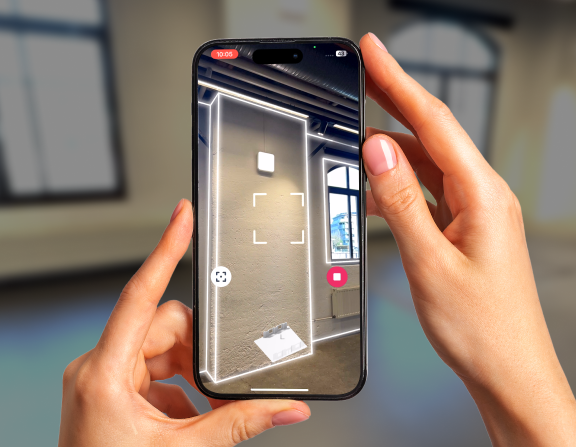
Scan existing buildings with your iPhone or iPad Pro. Export an IFC model directly into SketchUp. Accurate as-built geometry for renovation, redesign, and planning — no manual measurements, no redrawing.
Metaroom is a mobile 3D scanning app that turns iPhone Pro and iPad Pro LiDAR scans into structured IFC models. Architects, designers, and building professionals use it to capture existing buildings and export as-built geometry into SketchUp for renovation, redesign, and planning projects.
TRUSTED BY





TRUSTED BY
- HOW IT WORKS?
How to create an as-built SketchUp model from a scan
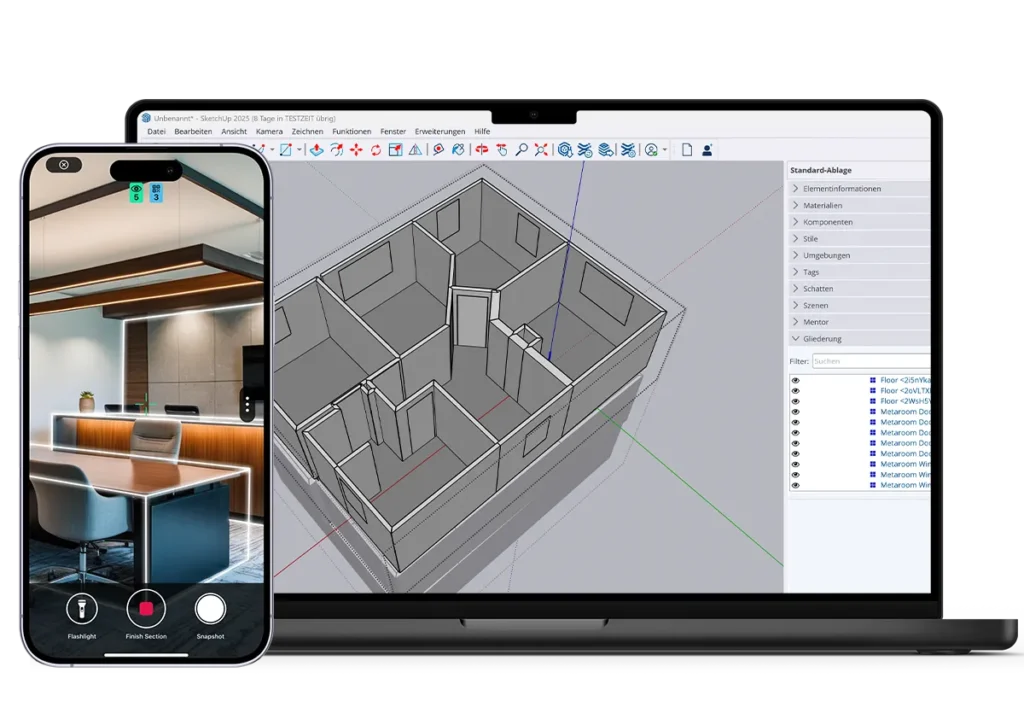
To create an as-built model in SketchUp from a scan, use Metaroom to scan the space with an iPhone or iPad Pro, export the IFC file, and import it into SketchUp. The process takes minutes.
Scan the existing building
Open Metaroom on your iPhone Pro or iPad Pro. Walk through the space. The app captures walls, doors, windows, and room dimensions automatically using the built-in LiDAR sensor.

Export the IFC model
Generate an IFC file from your scan. The model includes accurate geometry and spatial data — walls, openings, and dimensions — ready to import into SketchUp.

Design in SketchUp with real building data
Import the IFC model into SketchUp. Walls, openings, and dimensions are already in place. Use the as-built geometry as your starting point and begin designing immediately.
- Accelerate design workflows with the Metaroom + SketchUp integration
As-built models ready to design with in SketchUp
Metaroom gives you structured building data you can edit in SketchUp — not a point cloud you need to trace.
As-built dimensions you can trust
Every wall, door, and window is captured with up to 99% accuracy, measured in centimeters. No tape measures, no guessing from photos, no missing dimensions. Your SketchUp model starts with reliable site data from day one.
A clean IFC model, not a point cloud
Metaroom exports structured IFC geometry — not a raw scan you need to trace over. Walls, doors, and openings are already defined as editable building elements. Import into SketchUp and start working immediately.
From site visit to SketchUp model in minutes
Scan a room in minutes with your iPhone or iPad Pro. Export the IFC file. Open it in SketchUp. What used to take hours of manual measurement and CAD redrawing now takes a fraction of the time.
Who uses Metaroom with SketchUp?
Metaroom is used by architects, interior designers, building surveyors, and contractors who need accurate as-built documentation before starting design or planning work in SketchUp.
Architects preparing renovation projects.
Capture existing floor plans before starting a redesign. Scan the building, export the IFC model, and use it as the base layer in SketchUp. No manual measurements. No redraws.
Interior designers capturing existing layouts
Document room dimensions and spatial relationships accurately. Start space planning in SketchUp with real building data instead of rough sketches or assumptions.
Surveyors documenting as-built conditions
Complete site documentation faster. Scan multiple rooms, export IFC files, and deliver accurate as-built models to project teams working in SketchUp.
Contractors preparing estimates and quotes
Get reliable room dimensions before quoting a job. Scan the space once, avoid return site visits, and share the model with designers or planners working in SketchUp.
Metaroom vs. point cloud workflows in SketchUp
| Feature | Point Cloud Workflow | Metaroom |
|---|---|---|
| Output format | Raw point cloud (E57, LAS, PLY) | Structured IFC model |
| Editing in SketchUp | Manual tracing required | Edit geometry directly |
| Building elements defined | No — manual interpretation | Yes — walls, doors, windows |
| Additional tools needed | SketchUp Studio or plugins | None — IFC import works in SketchUp Pro |
| Per-scan cost | Varies ($0.15/sqft+) | Included in subscription |
| Scan device | Tripod scanners, phones, drones | iPhone Pro or iPad Pro |
| Accuracy | Depends on tracing quality | Up to 99%, measured in centimeters |
Point cloud workflows bring scan data into SketchUp, where designers can reference the scan while building geometry for their project. Tools such as SketchUp Scan Essentials, Polycam, or Undet allow you to visualize and work with point cloud data directly in SketchUp.
Metaroom takes a different approach by exporting a structured IFC model where walls, doors, and openings are already defined. This allows you to open the project in SketchUp and start editing the geometry immediately.
Frequently asked questions about Metaroom and SketchUp
How do I scan a building for SketchUp?
To scan a building for SketchUp using Metaroom, open the Metaroom app on your iPhone Pro or iPad Pro. Walk through the space — the app automatically captures walls, doors, windows, and dimensions using the built-in LiDAR sensor. When the scan is complete, export an IFC file and import it directly into SketchUp.
What export format does Metaroom use for SketchUp?
Metaroom exports IFC (Industry Foundation Classes) files for use with SketchUp. IFC is an open standard for building data exchange and can be imported directly into SketchUp Pro and later versions. Metaroom also supports DXF, PDF, and GLB exports for other workflows.
What is the difference between a point cloud and an IFC model?
A point cloud is a collection of raw 3D data points representing surfaces — it requires manual tracing in SketchUp to create usable geometry. An IFC model from Metaroom contains structured building elements (walls, doors, windows) that you can edit directly in SketchUp without tracing. IFC models save significant time compared to point cloud workflows.
How accurate are Metaroom scans?
Metaroom scans are accurate up to 99%, with measurements in centimeters. This level of accuracy is sufficient for renovation planning, material calculations, energy assessments, and as-built documentation in SketchUp.
Do I need a tripod or external 3D scanner?
No. Metaroom works with the built-in LiDAR sensor on iPhone Pro and iPad Pro models. No tripod, no external 3D scanner, and no additional hardware is required. You scan by walking through the space with your device.
How long does it take to scan a room with Metaroom?
Scanning a single room with Metaroom takes minutes. The complete workflow — from scanning a space to having a structured IFC model open in SketchUp — is significantly faster than manual measurement and redrawing in CAD.
Can I use Metaroom scans for renovation planning in SketchUp?
Yes. Metaroom is commonly used for renovation planning in SketchUp. The IFC model provides accurate as-built geometry — walls, openings, and dimensions — that serves as the base layer for redesign projects. Architects and interior designers use this workflow to skip manual site documentation.
Is Metaroom free?
Metaroom offers a free trial to test the full scanning and export workflow. After the trial, it runs on a subscription model with no per-scan fees — you can scan as many rooms as you need. This differs from some competing services that charge per square foot for processed scan outputs.
Which SketchUp versions support IFC import?
SketchUp Pro 2021 and later versions support IFC file import. If you are using SketchUp Free (web version), IFC import is not supported — you will need SketchUp Pro or SketchUp Studio.
Can I use Metaroom with other CAD software besides SketchUp?
Yes. Metaroom supports multiple export formats including IFC, DXF, PDF, and GLB. These formats are compatible with other CAD and BIM tools such as Archicad, Revit, RELUX, DIALux, and Vectorworks. The SketchUp integration uses the IFC export specifically.